
How to Check Your Product Number
You can search for products using the 6‑digit product number shown on the product tag, care label, or product page. Follow the steps below to find where the product number is located.
Table of Contents
*Find the product number on the product tag or care label
*Find the product number on the product page
*Find the product number in your purchase history
*Frequently asked questions
The product number is the 6‑digit number highlighted in red on the product tag or care label.
Product tag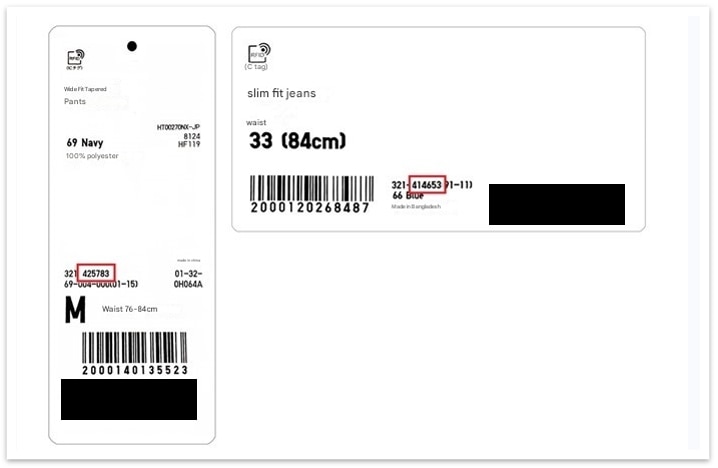
Care label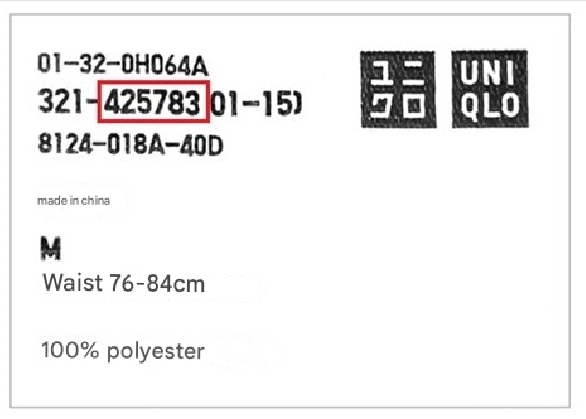
On the product page, the product number is displayed in the “Description” and “Details” sections.
Log in to Purchase History and select Details. The product number is shown in the red box for each item.
Orders placed online
In‑store and online purchase history
-
How can I search for a product using a product number?
Select the magnifying glass icon at the top of the online store and enter the product number in the search bar.
* Only products that are currently available for sale can be searched.
Contact UNIQLO EU
 CHAT SUPPORT
Monday-Friday: 10am-9pm
Saturday-Sunday: 11am-6pm
24th, 26th, 31st December and 1st January: 11am - 6pm
Closed : Christmas Day and Easter Sunday.